

Every part of the public web PKI is being squeezed shorter. Chrome's root program now says subordinate CAs should top out at three years, and the CA/Browser Forum has a roadmap that walks TLS leaf certificates from 398 days down to 47. None of that binds your internal ADCS. Your private hierarchy answers to your own trust store, not to a browser root program. But it tells you where the wind is blowing, and it lines up with something I already believe: nothing we issue today survives the move to post-quantum algorithms. Every certificate in your estate gets reissued on PQC-capable templates eventually. The more often you already touch this stuff, the less it hurts when that day arrives. So I build short now. One year for leaf certificates, full stop. Treat the renewal cycle as practice for the migration you know is coming.
That position changes the laddering math, so let me start there, because it leads straight into a gotcha that the recommended build process hands you for free.
The ladder is a convention, not a calculation
The old Microsoft guidance was to size each CA off the longest leaf it serves and roughly double as you go up the tree. Two-year leaf, four-year issuing CA, eight-year root. Renew at half life. It is a clean rule and it works.
It is also entirely a design convention. ADCS does not compute "half the parent" anywhere. When a CA issues a certificate, the validity it stamps is simply the shortest of three numbers:
- the validity asked for by the template or the request,
- the CA's own issuance ceiling, set in the registry,
- whatever lifetime the issuing CA has left on its own certificate.
Shortest one wins. There is no doubling, no halving, no awareness of where this CA sits in the chain. Keep that in mind, because the trap lives in the gap between two settings that look like one.
The gotcha, and it comes from the recommended build
Build an offline root the way everyone is told to. You want a long-lived root, so you drop a CAPolicy.inf in C:\Windows to set its life. Mine looked like this:
[Version]
Signature = "$Windows NT$"

[certsrv_server]
RenewalKeyLength = 4096
RenewalValidityPeriodUnits = 8
RenewalValidityPeriod = years
Run the configuration wizard, type 8 years to match, install. The root certificate comes out at eight years, exactly as intended. Then you stand up the issuing CA, generate its request, take it to the root, sign it. The subordinate certificate comes back valid for one year. Not eight. Not four. One.
Nothing you typed said one year. The CAPolicy.inf said eight. The wizard said eight. The sub still landed at one.
Two settings, not one
RenewalValidityPeriod and RenewalValidityPeriodUnits in CAPolicy.inf set how long the root trusts itself. That is the root's own certificate, and nothing else. They do not touch what the root hands out.
What the root will issue is governed by a completely separate pair of registry values under HKLM\SYSTEM\CurrentControlSet\Services\CertSvc\Configuration\<CAName>:
ValidityPeriod(string, for example "Years")ValidityPeriodUnits(DWORD)
This is the issuance ceiling. It caps everything the CA signs, including a subordinate CA certificate. And here is the part that bites: when a CAPolicy.inf is present, the installer reads your renewal settings for the self-signed cert and leaves this issuance pair sitting at its default of one year. It does not copy your eight across, and it ignores the number you gave the wizard. I have watched it land on one across more than one build. The root lives for eight years and will only ever issue one-year certificates until you say otherwise.
So the path that produces a proper root, the one with the policy OID, the renewal key length, the CRL settings and the practice statement you actually want, is the same path that quietly pins your issuance ceiling at one year. The recommended build is the one that arms the trap.
What it looks like
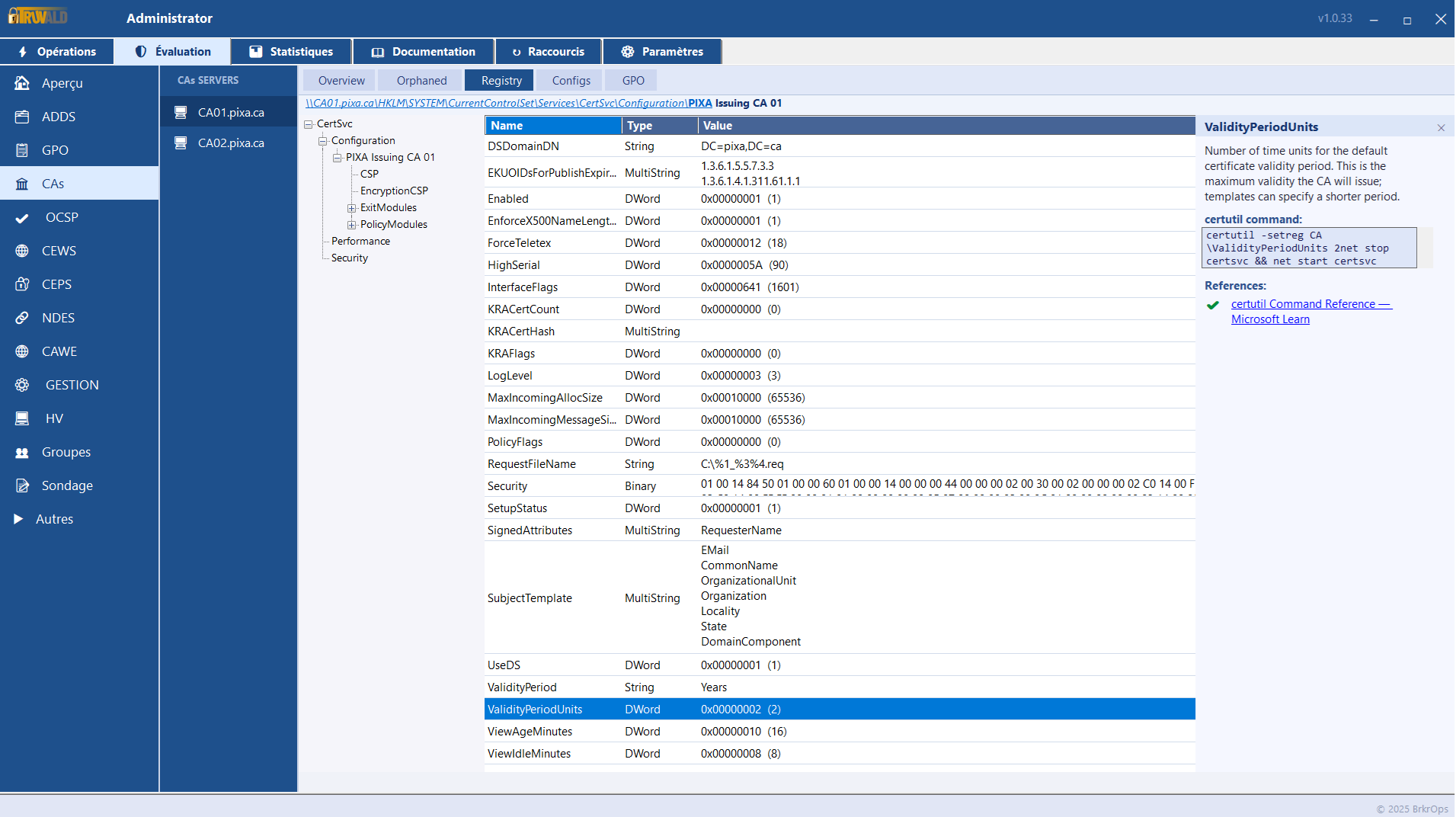
That is Truvald reading the registry on the issuing CA, where ValidityPeriodUnits shows 2. The root in the same build came up at 1. Same value, two CAs, two very different numbers, and only one of them is the number anyone set on purpose. Truvald spells out what the value does and the exact command to change it, which is the next part.
The fix
On the root, set the issuance ceiling to whatever you actually want the sub to be, then restart the service:
certutil -setreg CA\ValidityPeriod "Years"
certutil -setreg CA\ValidityPeriodUnits 4
net stop certsvc && net start certsvc
Resubmit the issuing CA request, sign it again, and the subordinate certificate comes out at four years instead of one. The four is just an example. Set it to your design. The same move applies anywhere in the chain. If a CA is handing out certificates shorter than you expect, the issuance ceiling is the first place to look, not the template.
Why it matters more now
When leaf lifetimes were measured in years, a misread issuance ceiling was an annoyance you caught once and forgot. As lifetimes shrink and you start touching renewals on purpose, every CA in the path needs its ceiling set deliberately, not left at whatever the installer defaulted to behind your back. Set it consciously. Write it down. You are going to be back in here sooner than the old eight-year root ever let you think.
One for you to test
That one-year default is the CAPolicy.inf path, which I have built and confirmed more than once. There is a sibling case I have not put a screenshot to: build the root with no CAPolicy.inf at all, and just tell the wizard four years. Where does ValidityPeriodUnits land then? With no renewal setting in play, the self-signed cert has nothing but the wizard value to read from, so there is an argument that the registry has to carry your four. But the only number I trust is the one that comes back from certutil -getreg CA\ValidityPeriodUnits. If you have built a root that way, run that command and tell me what you got. I want to close the gap before I call it settled.